
Explored, Designed, Delivered.sm |
Tables are already structured |
 (@NetlabLoligo)
|
Conventions:
CTX - Creativyst® Table Exchange FormatA low-overhead alternative for exchanging tabular data v1.0e
Contents
Overview
This article specifies CTX, a simple, shared, low-overhead
exchange format. It can be used for simple tasks, such as exchanging rows of a
single table without header information, up to more complex tasks, like
exchanging multiple tables, along with their field names, types and comments.
It will also facilitate the exchange of complex hierarchical data structures.
CTX is a more precisely defined and functional alternative to CSV, and a lower overhead alternative to many applications of XML. The CTX exchange format embodies the simplicity of CSV, while permitting, via optional secondary mechanisms, the exchange of data with complex structural hierarchy. CTX achieves low overhead by permitting data-types to be tagged with type, display, structure, help, and other information. By tagging types instead of data, CTX vastly improves bandwidth-usage over the strategy of tagging every value-instance with two identical nametags. This also permits rich meta-information to be shared about the data being exchanged. The added metadata is optional for writers, and, if present, may be used or ignored at the option of reading applications.
Philosophy and Goals
The CTX Convention
Convention Name: Creativyst Table Exchange Format (CTX)
File Extension (if applicable): '.ctx' (case insensitive) Recommended mime type: application/ctx (not registered as of writing)
. . . PRIMARY (CORE):
. . . SECONDARY: (non-core, but readers must handle CTX files with these features)
Escape Sequences
Escape sequences are used to replace specific bytes, or to denote specific
functions within the data exchange stream.
Escape sequences are classified by their function and width:
All escape sequences are introduced by a backslash ('\'), which is called an escape sequence introducer. If a file contains a backslash followed by a character that is not defined here, it is an error for this version of CTX. Case matters. For example, a '\P' (primary type record follows) is not the same as a '\p' (pipe character escape). Also, a '\T' is a legal code at the first character position of a record, while a '\t' is always illegal.
. . . . . CR(0x0d), LF (0x0a), '\' (0x5c), and '|' (0x7c) within field data MUST be replaced with \r, \n, \i, and \p sequences respectively. Also, when ';' (0x3b) exists within a multi-byte replacement sequence, it MUST be replaced with \s. Escape sequences other than those defined here may not appear in CTX encoded data.
. . . . . Core:
. . . . . Optional:
. . . . . First character record-type sequences are only valid when they start in the first character position of a record (the first character of a line, or the first character following CR or LF). They denote that the record on the line is not data, but a special type that performs a CTX function. These records generally apply to the data records that follow them up to the end of the file, or to the next record-type record of the same type.
Table and database groupings:
Field Names and descriptions:
Field types:
Field storage size and display suggestions:
. . . . . Multi-byte sequences MAY be used by a CTX WRITER to translate difficult byte codes to more transportable representations. This MAY be used to transport a table or set of tables over an ASCII-only email link, for example. Multi-byte sequences are completely optional for WRITERS, but READERS are REQUIRED to handle them and translate them. They may be used by a CTX WRITER to accommodate channels that are known to be text-only (non-binary). A binary channel is assumed by default.
Hex Sequence (\m[#]x...;):
Base64 sequence (\m[#]b...;)
Backtracking (and Redundancy) Feature
The first time a header type, size, name, or description record occurs within
a group of
records, that header type's directives WILL be applied to all the records
that came before it, up to the group delimiter (A “\T,” a
“\G,” or the start of the file or transmission).
The term “header” is a bit of a misnomer when applied to these
field type records (everything but \T and \G). They apply to the records
within their group, regardless of where they first appear within the group.
Aside from allowing type records to apply to all the fields in their group
without regard for their sequential location within the group, this also
provides for the use of redundancy in transmissions. This can be used to
ensure that types and other field directives are properly applied when long
transmissions are broken into multiple chunks (due to time or medium
constraints, or transmission errors, for example).
Important considerations regarding backtracking feature:
State Machines
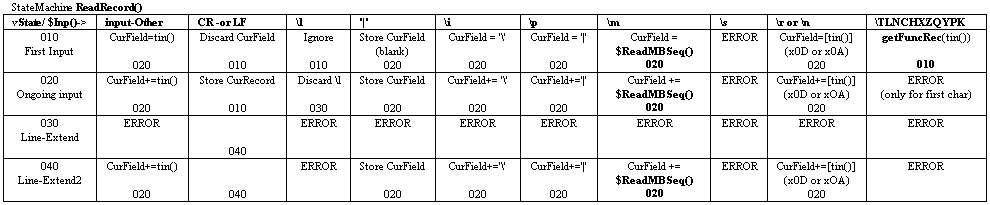
The state tables for the READER are presented here (see below) in order to
precisely define the CTX format and convention.
Those who've cut their teeth on Object Oriented Programming concepts may find state tables a bit confusing. The key to understanding state tables from an OOP perspective is to understand first, that they take the opposite extreme of the OOP (and functional-programming for that matter) "abstraction through complexity hiding" strategy. Instead of hiding lesser-used or normally unused constructs, state tables' strength comes from equally disclosing, in a visually graspable way, all trajectories through a problem space. That includes trajectories that would be considered abnormal, unusual, or erroneous. For many problem types, state table representations are the best choice for bridging specification to finished software code. Use of state tables permits a thorough visualization and understanding of the problem domain that is often not possible with more traditional methods. More importantly, you can code directly off of (from) these state tables. :-)
Also, in these state tables, i've included the '\l' function directly in the processing stream. Processing of the '\l' function MAY be done in a separate pass prior to performing the main CTX READER translations. In fact, '\l' handling may be performed upstream and in a different process altogether from the final reader. I handled them in a single pass at the reader:
Special Note: The state-tables presented below also show some
primary aspects of another project I'm currently working on.
In that project, I define a programming language where you not only call functions from within other functions, you can also call state-machines from within other state-machines. You can see this represented in the state-machines presented here. Functions are called like most function calls. State machine calls are denoted with a '$' to discern them from function calls. Each state-machine has a special object called 'tin', which returns the value (or event) that caused the last transition. NOTE: The first state machine displayed below takes a shortcut that puts all the function record specifier sequences in a single column. That is, instead of specifying a separate transition column for each of the escape sequences: '\T', '\G', etc., it simply labels one column with "\[TLNCHXZQYPK]". This was done primarily to save horizontal space, but it also makes the state table clearer, by showing that all these transitions are handled identically in every state.
|
|||||||||||||||||||||||||||||||||||||||||||||||||||||||||||||||||||||||||||||||||||||||||||||||||||||||||||||||||||||||||||||||||||||||||||||||||||||||||||||||||||||||||||||||||||||||||||||||||||||||||||||||||

|
StateMachine: Inp() // provides input to $ReadRecord(); $ReadMBSeq();
Function mCvrt(Type, N, tmp)
{
    1. if(Type == 'x') {
            ConvertHexToBytes(tmp)
        }
        if(Type == 'b') {
            ConvertBase64ToBytes(tmp)
        }
    2. if(Error during conversion) {
            return(Convert Error)
        }
    3. copy conversion output into OutputBuffer N times
    4. return OutputBuffer
}

Function getFuncRec(F)
{
    1. if(RecursionCheckAlreadyHere()) {
            ERROR
        }
    2. FRec = $ReadRecord();  // call state machine
    3. if(F == '\T') {
            PerformAnyTableRelatedProcessing();
        }
    4. if(F == '\G') {
            PerformAnyGroupRelatedProcessing();
        }

    5. if(IgnoreFuncRec(F)) {
            return
        }
    6. Store FRec
    7. return
}


/* . . . . .
 * These just give an example of some
 * of the kinds of processing you might
 * want to do for table/group boundaries.
 *
 * Of course, you could just ignore
 * the record and return.
 *
*/
Function PerformAnyTableRelatedProcessing()
{
    1. if(!DoTableProcessing) {
            return;
       }
    2. Store Previous Table.
    3. Allocate new table
    4. OtherProcessing()
    5. return;
}

/* Likewise for Group (Database) records
*/
Function PerformAnyGroupRelatedProcessing()
{
    1. if(!DoGroupProcessing) {
            return;
       }
    2. Store Previous DataBase.
    3. Allocate new DataBase
    4. OtherProcessing()
    5. return;
}
Optional Primary Types (\P)
The optional primary field-type record (\P) is used to relate
basic field types, or hierarchy information
that MAY be handled directly by the CTX reader.
. . . . . Aside from the CTX/hierarchy type ('C'), CTX has only two explicit, elemental, primary field types. They are:
. . . . . CTX includes a special primary type ('C') that lets you embed CTX encoded records, tables, and even entire databases directly within individual fields of the current-level CTX file. In my opinion (and it is just my opinion) there is a considerable amount of data in the world for which the type-level hierarchical partitioning supported by this mechanism may be better suited than the value-level hierarchical partitioning specified in XML.
. . . . . If a \P record is defined but is blank it is specified as ambiguous, a sort of deliberate 'don't care' condition. This is true for trailing fields in records that contain more fields than their respective \P record. Fields in tables for which no \P record is transmitted may also be considered specifically ambiguous.
. . . . .
. . . . . The following box contains some notes about optional primary types that may be important to implementers of CTX writers, readers, as well as applications that employ CTX.
Writer:
    N   Numbers or 'fixed' fields
        Numerically typed fields, if used, MUST be represented in ASCII
        digits and punctuation.  If numeric application types are
        represented in ASCII they MUST be formatted according to the
        format specifications for the standard C library fprintf() function
        for format codes 'f', 'i', 'x', 'e', or 'd' ("fixed").
        No other ASCII formats are permitted.  Leading zeros, and
        leading and trailing spaces may be included only as recommended
        for the standard C printf() function format specifications for
        fixed formatted numbers.

        If there is a \P field definition of 'N', a numeric field must be
        written as a number type as described above.

        Native types SHOULD be exchanged as 'fixed' types, even if primary
        types are not used.


    B   Non-number or 'B'inary fields
        Non-number or Binary fields should be translated byte-for-byte
        into their escaped values for the CTX field.  Each byte in the
        source field must be represented in the CTX field in a way that
        will be translated exactly back into the source byte by the reader.

        The writer MAY choose to escape the bytes of the field so that it
        can be safely transported over restricted channels (such as ASCII
        only email).  The writer may use \mx..;, \mb...;, and \l functions
        to perform this.  The \l function must be applied (effectively)
        after all other translations have been performed.


Reader:
    See the state-tables.


Application:

    1. If a \P record exists a reading application MAY choose to
       use it or ignore it.

    2. If a \P record exists and the respective \P record field
       value is 'N' a reader application MAY choose (as per 1.) to
       interpret the data-record field as a number in ASCII
       representation, and convert it into a native numeric
       representation for the application or platform the
       reader is serving.

    3. If a \P record exists and the respective \P record
       field value is 'B' a reader MAY choose (see 1.) to interpret
       the data-record field as a string, even if it contains properly
       formatted ASCII representations of numbers.  This can be useful
       (for example) for representing numbers where leading zeros
       have meaning and should be preserved (such as U.S. zip codes).
Examples
I'll use the following database to show some basic features and answer some
basic questions about the workings of CTX.
. . . . .
A Faux Database

---------           ---------
Persons             Pets
---------           ---------
Number(P)           Number(P)
LastName            Owner(F:Persons.Number)
FirstName           Name
                    Species
                    Breed
. . .
Persons data:
----------------------------------------
Number  LastName            FirstName
----------------------------------------
1       Smythe              Jane
2       Doe                 John
3       Mellonhead          Creg

. . .
Pets data:
---------------------------------------------------------------
Number  Owner   Name        Species         Breed
---------------------------------------------------------------
1       1       Fluffy      Dog             Poodle
2       1       Sharp       Dog             German Shepard
3       2       Silo        Cat             Mix
4       3       Doggie      Dog             Mix
. . . . . At its simplest, CTX will transmit just the data records of a given table much like CSV. For example, to share the data from the "Persons" table we could simply send
1|Smythe|Jane
2|Doe|John 3|Mellonhead|Creg This is a complete and correct CTX transmission, as are all the following CTX examples.
. . . . . In CSV the header (column names) are often sent as the first record in the file. Problems arise, however, because reading applications have no way of knowing if the first record is a header row, or the first data record. CTX solves this problem with special record types that start with '\L' (Labels), and '\N' (Names). Labels should consist of only characters from the set: [A-Za-z0-9_].
\LNumber|LastName|FirstName
1|Smythe|Jane 2|Doe|John 3|Mellonhead|Creg There's no reason why you can't WRITE the labels as field NAMES as well, you can even make an '\L' and '\N' record that are exactly the same in every other respect. But, you may want to use the less restricted \Name record to convey slightly more readable (but still short) names for the fields.
\LNumber|LastName|FirstName
\NPerson Number|Last Name|First Name 1|Smythe|Jane 2|Doe|John 3|Mellonhead|Creg CTX provides other meta-record types to describe field Comments ('\R'), display sizes and alignments ('\D'), even fly-over help ('\H') among others.
. . . . . CTX also provides meta-record types to define field types. One example might be to use the SQL-Type record ('\Q') to impart field types for our Persons table.
\LNumber|LastName|FirstName
\NPerson Number|Last Name|First Name \QNUMBER(7)|VARCHAR(65)|CHAR(35) 1|Smythe|Jane 2|Doe|John 3|Mellonhead|Creg Other meta-records that impart field TYPE information include application specific type names ('\Y'), primary CTX types ('\P'), and key indicators ('\K').
. . . . . Want to convey some information about the table you're sending? Use the '\T' (Table) record type.
\TPersons|People Table|Pet owners in our example db|Pet owners|||
\LNumber|LastName|FirstName \NPerson Number|Last Name|First Name \QNUMBER(7)|VARCHAR(65)|CHAR(35) 1|Smythe|Jane 2|Doe|John 3|Mellonhead|Creg
. . . . . You can also use '\T' records alone to delimit a group of multiple tables.
\TPersons|People Table|Pet owners in our example db|Pet owners|||
\LNumber|LastName|FirstName \NPerson Number|Last Name|First Name \QNUMBER(7)|VARCHAR(65)|CHAR(35) 1|Smythe|Jane 2|Doe|John 3|Mellonhead|Creg \TPets|Pets owned by people|Pet list in our example db|Pet list||| \LNumber|Owner|Name|Species|Breed \NPet Number|Owner Number|Pet Name|Species|Breed \QNUMBER(7)|NUMBER(7)|CHAR(35)|CHAR(35) 1|1|Fluffy|Dog|Poodle 2|1|Sharp|Dog|German Shepard 3|2|Silo|Cat|Mix 4|3|Doggie|Dog|Mix Here, our entire database has been sent in a single CTX file. Note also that this continues to be a legal CTX file. The extra blank line we've put between tables for clarity here is perfectly acceptable in a CTX file because blank lines are ignored. This same behavior means CTX implementations need not be concerned with platform-dependent differences between line endings (CR, LF, CRLF, LFCR).
. . . . . You can also add a '\G' (Group) record to impart information about a group of multiple tables (a database).
\GFauxDB|A Faux Database|An entire (if contrived) example db||||
\TPersons|People Table|Pet owners in our example db|Pet owners||| \LNumber|LastName|FirstName \NPerson Number|Last Name|First Name \QNUMBER(7)|VARCHAR(65)|CHAR(35) 1|Smythe|Jane 2|Doe|John 3|Mellonhead|Creg \TPets|Pet owned by people|Pet list in our example db|Our furry friends||| \LNumber|Owner|Name|Species|Breed \NPet Number|Owner Number|Pet Name|Species|Breed \QNUMBER(7)|NUMBER(7)|CHAR(35)|CHAR(35) 1|1|Fluffy|Dog|Poodle 2|1|Sharp|Dog|German Shepard 3|2|Silo|Cat|Mix 4|3|Doggie|Dog|Mix
. . . . . The '\G' records in CTX permit you to send multiple databases in a single CTX file in the same way '\T' records permit multiple tables. Just delimit each database with a '\G' record... . . . . . . . . . . .
FAQ
If you have questions
contact me,
or ask them in
the forums.
No. If your primary concern is the ability to have users exchange data between your application and their general purpose productivity applications (like Microsofttm Office, or OpenOffice), you should first support CSV, not CTX. The reason? Because CSV is the one used by the world's biggest software provider, and so CSV is the one everybody else in the world uses. That said, CSV has many problems and shortcomings, so once you've added CSV support for interoperability, you may want to add CTX support for vastly improved functionality between your own applications.
These days of course, the defacto choice is XML. The best reason to select XML, is that nobody ever gets fired for choosing XML. But since you've already taken care of most interoperability issues by supporting CSV, you may be freer to choose your next exchange format based on actual technical merit. If that is the case, consider this: Basic XML, other than attaching two identical name-tags to EVERY instance of EVERY value, has very little inherent functionality. CTX, on the other hand, provides a great deal of inherent, expandable functionality, while requiring very little overhead. Also, (unlike XML) much of the functionality built into CTX is generalized, and doesn't require you to write specialized support code for each new XML application (sometimes called dialects) you wish to interact with. How many XML dialects could there be out there? There are tens of thousands.
This was actually considered for the first clients who needed a secondary exchange format (after CSV had been added). It was rejected after the analysis, mainly because SQL was deigned to be a VERY good database maintenance and query language, which doesn't necessarily translate to a good exchange format. The issues included high overhead bandwidth usage, and slight but insurmountable syntactical differences in the formats and features of insert statements.
While CTX ignores lines with only CR or LF in CTX files, it doesn't prevent you from conveying blank records. There may be times when you need to convey blank records between sending and receiving applications. One possible reason for this might be for backups where it is desirable to convey an exact image of the records in a table. Do it this way:
|
A record sent with a single field separator will not be interpretted as a blank line to be ignored by CTX. Instead it will convey a record with all blank fields to receiving applications. Do NOT do this:
[space-character: 0x20]
Sending a CTX line with a single space character so that the CTX readers will not interpret it as a blank line wont work. It will convey a record in which the first field is filled with a space character (which is not a blank record).
Yes. Channels with encoding schemes that only use a single letter-case, such as BAUDOT, and Vail Codes (Morse Code), will not transport CTX directly because CTX uses case differences in the optional portions of its exchange format. Also, transports with encodings that don't include the CTX overhead characters CR, LF, '\', '|', and ';' will be a problem because CTX needs these for its own encoding. Certainly, some form of secondary escaping scheme could be applied "below" the CTX translator (closer to the PHY) in order to permit transport over channels with these character limitations. But such secondary escaping schemes are not currently part of CTX in any way.
Yes. It can be transported as pure binary data or it can be transported as a text block if writers (or intermediate translators) use \m...; sequences to convert the unacceptable code points. I recommend the latter. If you need a mime type use the one recommended by the convention.
Miscellaneous
Following, are some random notes and thoughts that came up during the
specification that may or may not be useful to those implementing this
convention.
. . . . . At its simplest, only rows of data, with no function records (records that start with a '\' and a capital letter) and no multi-byte (\m...;) encodings are included. This is approximately equal in complexity to a CSV file. At its more complex, a CTX file or transmission may carry multiple tables along with detailed meta-data about each table and each field. All readers MUST read and gracefully deal with this complexity, even if it is simply to discard the extra information if it will not be used by the reader's application.
The reader must be able to read all byte values (x00-xff). If application is unable to deal with some byte values, the next level above the CTX reader must take appropriate measures to produce an error, remove them, or alter them from the output of the CTX reader before passing them on to the application. How the application deals with byte codes that are not acceptable to a given application is not part of the standard and is undefined by the standard.
Some primitive run-length compression of field data may be performed using special optional encoding provided by the \m[#]...; sequences. For example, a group of 1000 0x00 bytes can be represented in a CTX field with the sequence "\m1000x00;" (a 100:1 compression ratio :-) wow). No other compression is defined to be part of the CTX recommendation. If an external compression scheme like zip is used, it is suggested that it SHOULD be applied to the entire CTX record after translation, as the CTX overhead will be relatively more redundant, and therefore more compressible, than most other data. Files that have had compression other than that provided by CTX's '\m[#]...;' sequences applied to them MUST NOT be referred to as CTX files. Only files which can be read by the standard CTX READER (see State Machines above) should be considered CTX files.
Future release are likely to include:
[PRELIMINARY]
CTC / CTX-c: Comma Delimited CTX (Spreadsheet Compatible)
[Note: Preliminary - The following is very preliminary
and has not yet been fully designed or finalized.]
CTC (or CTX-c, or CTXc, or CTXc) is a CSV compatible CTX format
that serves as a "bridge" format for simple data sharing with
desktop productivity tools.
It is essentially a way to produce CTX files that
can be read by popular desktop productivity tools (such as spreadsheets)
for the express purpose of doing graphing and other types of analysis on
numerical and other forms of data-sets.
. . . . . . .
. . . . . . . When producing a CTX file from a CTC file, simply reverse the above conversions.
Reading and writing CTX-c with a spreadsheet program To produce a CTX-c file from within your desktop spreadsheet, simply save it as a CSV file using your spread sheet's save facility. If your data fields have embedded commas, double-quotes, or new-line characters you will have to first convert them to their CTX \mx...; equivalents. You can perform this manually, or write a small macro to perform the conversions for you.
If your data has a basic header-row containing column names you may
(optionally) add a CTX header When you read a CTX-c file into a spreadsheet, read it in as a CSV file. You may have to change the extension to ".csv" Any fields with embedded commas, double-quotes, or new-line characters will display as their CTX \mx...; replacements. If you need these fields for your analysis, you will have to either convert them manually, or write a small macro to convert them for you.
Permissions
The CTX recommendation is © Copyright, Creativyst, Inc. 2005-2011 ALL RIGHTS
RESERVED.
Permission to use the functionality described
in this unmodified convention as
a component in the designs of commercial or personal products and software
offerings is hereby granted provided that this copyright notice is included
in its entirety in a form and location that is easily readable by the user.
It is important to note that the above permission does NOT include or
convey permission to copy this article describing CTX
(see below).
Links to this article are always welcome. However, you may not copy, modify, or distribute this work or any part of it without first obtaining express written permission from Creativyst, Inc. Production and distribution of derivative products, such as displaying this content along with directly related content in a common browser view are expressly forbidden! Those wishing to obtain permission to distribute copies of this article or derivatives in any form should contact Creativyst. Permissions printed over any code, DTD, or schema files are supported as Creativyst's permission statement for those constructs.
Version History
|